16 body doubling apps for ADHD that actually help you start


By FLOWN
•
Mar 09, 2026
Remote work promised freedom. What it delivered was a quieter room with louder interruptions.
Adult ADHD affects an estimated 4.4% of U.S. adults. And with remote roles making up about half of the U.S. workforce, that’s a lot of people trying to self-start, self-regulate, and stay motivated in a system that pings like a slot machine.
That’s where body doubling stops sounding like a quirky internet hack. The science shows it’s a practical counter-move.
These apps and platforms don’t “fix” ADHD or magically hand you focus. They put a real human (or a real room of humans) next to your work, so starting is easier, drifting is less likely, and momentum has somewhere to stick.
Preview of 15 best body doubling apps on the market
FLOWN: facilitator-led “flocks” that feel like structure, not pressure, plus a real community behind it.
Focusmate: the simple magic of a 1:1 session that makes you actually show up.
Flow Club: host-led check-ins and check-outs that turn “I should” into “done.”
Caveday: guided focus “caves” that users praise for discipline and less guilt while working.
StudyStream: always-on 24/7 focus rooms for finding a study buddy and staying locked in.
LifeAt: vibe-first focus spaces that people come back to for the “environment” more than the toolset.
Cofocus.one: super easy 1:1 matching and a clean setup that gets you into a session fast.
dubbii: live sessions plus an “amazing community” energy that users rave about.
Shimmer: coaching-backed support, with body doubling as an extra layer people find genuinely motivating.
Inflow: users consistently call out the coworking sessions and the stigma-free support vibe.
Think Divergent: text-based body doubling that users love because it’s easy, accessible, and low-pressure.
Cosmos.video (Focus Rooms): instant body doubling without scheduling, cameras on, mics muted, quiet accountability.
Flipd: “Study Live” timers that motivate by showing you how many people are studying with you.
Focumon: gamified focus that people love for making accountability feel fun, not clinical.
Kaizen: a polished pomodoro setup with focus rooms and task tracking.
How we picked the best body doubling platforms

This list is not about who has the prettiest landing page, although we are trying to build a few of those. It’s who reliably gets people to start, stay, and finish when focus is fragile.
At FLOWN, body doubling is the foundation, not a side feature.
That means we see the patterns up close, what helps people with ADHD get traction, what creates real follow-through, and what looks good on paper but falls apart after week two.
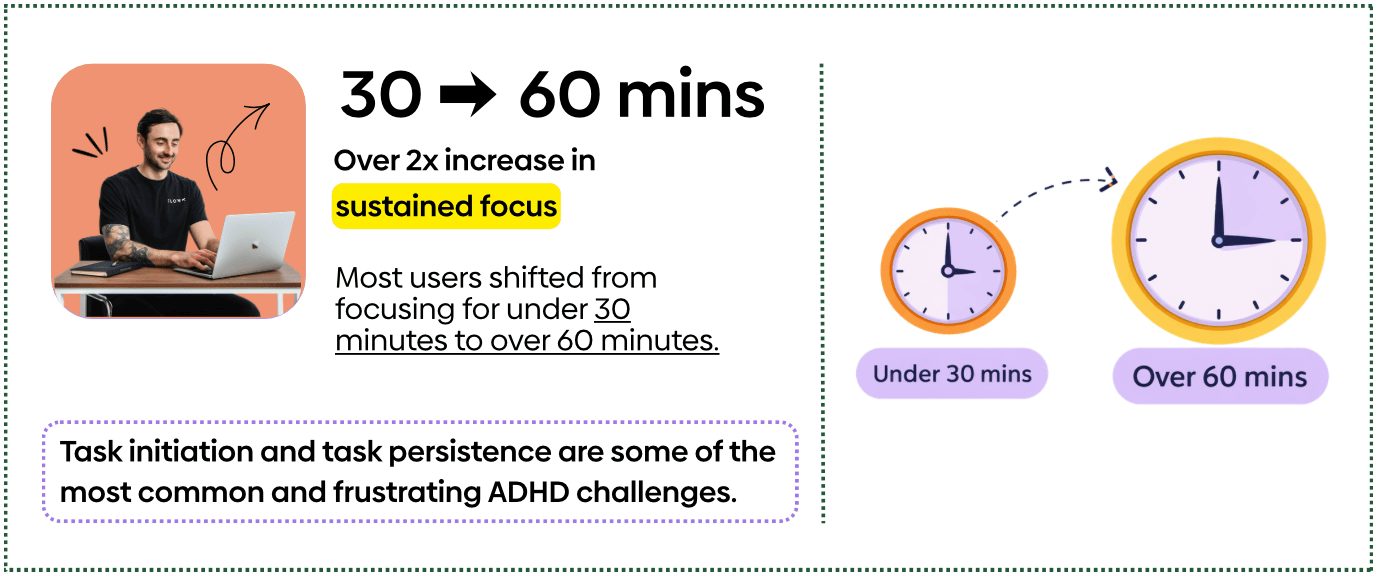
To pressure-test the impact of body doubling, we surveyed our members before and after 12-weeks of consistent use of body doubling. The results point in the same way as what we see day to day, which is that body doubling is associated with faster task re-engagement, consistent and longer sustained focus, a higher quality work, and reduced stress, making the workday feel more manageable. You can read the full report here.
What we looked for in these apps:
Body doubling is core (or close to a core), not a tiny add-on.
Clear proof of demand, real communities, repeat users, strong word-of-mouth.
Session design that reduces friction, quick entry, simple rules, and predictable flow.
Accountability mechanics that feel supportive, not awkward or high-pressure.
ADHD friendliness, options for low-stimulation sessions, gentle structure, clear prompts.
Consistency support, scheduling, routines, streaks, hosts, or smart nudges.
Safety and comfort, privacy controls, clear norms, and sensible moderation.
Product clarity, you can tell what it does in 10 seconds and use it in 60.
If you’ve read our other app roundups, this approach will feel familiar. We use the same “does it actually change behavior” lens in our guides to the best time blocking apps, focus apps, accountability apps, ADHD apps, and procrastination apps.
#1 FLOWN: Facilitated body doubling

FLOWN is body doubling when you need a bit of shape around the hour.
You can jump into a session anytime, set a strong goal or a measurable goal, work silently in a room with others, then close the loop with a quick finish. It’s designed to make focus feel less like a solo wrestling match and more like a supported routine.
It’s also built to flex with your day. There are structured facilitated sessions when you need guidance, community rooms when you just need presence, 1:1 options when you want something more direct, and more format options.
The entire platform is customizable for an individual's day, so they are supported in focus. What’s more, and we hear this directly from our members, it puts genuinely great facilitators in your corner. They are the kind of people who care because they make the whole experience feel human.
That mix of structure and warmth shows up in how people describe it. One out of 300+ Trustpilot reviewers said the “virtual body doubling has given me the accountability I needed to accomplish my academic goals,” and highlighted how helpful the facilitators are.
5 most important features
Facilitated focus sessions led by hosts
24/7 Drop-In rooms
Intention setting + session chat
Built-in Pomodoro-style timer and focus tools
On-demand content + ability to host sessions
Pros
Facilitators add the “frame,” which helps when motivation is shaky.
More options than pure 1:1, including always-on drop-ins.
Clear session flow helps people start fast and finish clean.
Strong fit for ADHD body doubling needs because you can choose how much structure you want.
Cons
More “modes” than a single-purpose tool, which can feel like a lot if you only want one workflow.
Facilitated sessions run on a schedule, so timing and time zones can matter.
Full access is paid membership.
Group rooms can feel energizing or distracting depending on the day and the person.
#2 Focusmate: 1:1 accountability
Focusmate is virtual coworking built around one simple move: you book a session, get matched with a partner, say what you’ll do, then work quietly on camera and check out at the end.
What they provide is a scheduled, partner-based body doubling that turns “I’ll do it later” into “I’m already here.”
You book a session, get paired with another human on video, share what you’re doing, then quietly work side-by-side and check out at the end. Simple by design, because the whole point is removing excuses, not adding features.
And the best part is how consistently people describe the same payoff. One reviewer puts it plainly: “Phenomenal service. I can focus much more easily with someone working alongside me.”
5 most important features
25, 50, and 75-minute sessions for quick wins or longer deep work
Favorite partners so you can re-book people you work well with
Native video so sessions start fast without extra tools
Task modes + Quiet Mode for different contexts (desk, moving tasks, no mic
Calendar invites, chat, and integrations (Google Calendar, Beeminder, API)
Pros
Very low friction. Book, join, work.
Strong “show up” effect because it’s 1:1 and scheduled.
Flexible session lengths for different energy levels.
Great if you want accountability without coaching or discussion.
Cons
If video with a stranger feels awkward, the whole mechanic can feel like friction (a real tradeoff for some).
The app offers you to find another partner after 5 min of waiting which is cool but adds more friction if you are trying to get started
It’s mostly “quiet work together.” If you need facilitation and structure, you won’t get that layer here.
Paid plans are recurring, and refunds are limited.
Scheduling helps motivation, but it can feel rigid if you prefer drop-in spontaneity.
Read an in-depth comparison of FLOWN and Focusmate.
#3 Flow Club: Hosted sprints
Flow Club is a virtual co-working that borrows its best idea from group fitness classes.
You book a session, share what you are going to do, then work quietly while a host runs the room, keeps the timing tight, and closes with a quick debrief so you actually feel the finish line.
One member on Flow Club’s own site sums it up better than any marketing line: “Flow Club has been amazing for my ADHD. The body doubling concept really does work.”
What they provide are the host-led, structured coworking sessions with intention-setting, timed focus sprints, and a short celebration at the end. It is designed to help you pre-commit and follow through, especially when motivation is inconsistent.
5 most important features
Hosted sessions with check-in and debrief
Timed focus segments with optional focus music
Chat-only options for low talk sessions
Calendar invites and predictable scheduling
Built-in to-do list that resets each session
Pros
The host and choreography reduce decision fatigue; you just join and start.
Strong accountability loop, goal declaration at the start, closure at the end.
Flexible participation norms, you can use chat-only sessions or turn the camera off if needed.
Clear pricing and discounts for students, nonprofits, and active hosts.
Cons
It is not an instant drop-in; booking ahead is part of the model.
If you dislike group settings, even quiet ones, this can feel like social overhead.
The culture leans toward cameras on, which some people find tiring even when optional.
Price can be a blocker if you only need occasional sessions.
Read an in-depth comparison of FLOWN and Flowclub.
#4 Caveday: Guided monotasking
Caveday is what happens when someone turns deep work into a coached event. They call it “The Cave”. It’s a guided focus session on Zoom with cameras on, and mics muted, run by facilitators who structure the whole thing so your brain has fewer chances to bargain its way out.
Members tend to describe the same benefit in plain language: discipline. Caveday itself features this line on their site: “Caveday helps me with discipline. And as a freelancer, that is so hard.”
They provide live guided focus sessions, plus a 24/7 Focus Lounge for always-available virtual body doubling, and planning workshops depending on membership.
5 most important features
Guided “Cave” sessions on Zoom nearly every hour
Focused work sprints are designed to run about 45 to 52 minutes
24/7 Focus Lounge for round-the-clock accountability
Weekly planning workshops are included in the plans
Multiple membership tiers, including limited reservations and unlimited access
Pros
High structure, facilitation, timing, and “mono-task” energy are the whole point.
Options for different usage levels, from a few reservations to unlimited.
The 24/7 lounge covers the “I need help right now” moments.
Built-in planning workshops make it easier to translate focus into weekly momentum.
Cons
The “Cave” format is opinionated; if you want totally unstructured coworking, it may feel too guided.
Sessions run on Zoom norms (camera culture, scheduled starts), which is not everyone’s favorite.
Membership pricing varies by tier, but it can add up if you are only using it occasionally.
If your day is chaotic, committing to fixed sessions can be harder than drop-in rooms.
Read an in-depth comparison of FLOWN and Caveday.
#5 StudyStream: Always-on focus rooms
StudyStream is the “walk in, cameras on, get it done” version of body doubling at scale. They run public focus rooms that are open 24/7, so you can join whenever your brain finally decides it’s ready to cooperate.
And the community recommendation pattern is very consistent: when someone is stuck, people point them to StudyStream as a practical way to start. One Reddit user literally recommends joining StudyStream or Study Together and says the quiet part out loud, “Starting is the most difficult.”
They provide live focus rooms plus a broader “study OS” that mixes accountability with planning tools like Pomodoro, tasks, streaks, and ways to find the right people to study with.
5 most important features
24/7 Focus Rooms (multiple rooms, always open)
Video accountability via live study rooms
Pomodoro timers + task tracking built into the experience
Streaks and “pin” study partners for consistent accountability
Find-your-people filters and community layer (country, subject, interests, channels)
Pros
Immediate access. No scheduling needed, just join a room and start.
The scale is motivating, it’s hard to feel “alone” when thousands are live.
Built-in focus scaffolding (Pomodoro, tasks, streaks) helps consistency.
More social “find your tribe” capability than most pure body doubling tools.
Cons
Camera-on culture is a feature and a friction point. If that drains you, it matters.
It’s easy for “community” to become another distraction if you’re prone to it.
The product is doing a lot (feed, AI tools, streaks), which can feel noisy if you want minimalist focus.
Public rooms mean you’re sharing space with strangers, so comfort with that social layer is non-negotiable.
#6 LifeAt | Virtual focus spaces
LifeAt is basically a second screen for your brain.
You build a calming focus environment, then (when you want) you work alongside other people in shared virtual rooms. The body doubling angle is baked into its public co-working rooms, where everyone shares the same vibe, the same timer rhythm, and a little bit of social gravity that makes you stay put.
One Product Hunt reviewer summed up the effect perfectly: It “makes remote work so much less stressful and more productive.”
5 most important features
Focus with others (digital co-working rooms) with synced environments and a shared “we’re working now” energy.
Synchronized Pomodoro sessions so your work and breaks stay structured, even in a room with others.
Real-time chat and video in rooms for lightweight accountability and connection.
A big library of virtual spaces (cafes, libraries, lofi, nature, etc.) to match your mood and task.
Task planning and time-boxing with tags and week view, so your focus session has a plan, not just vibes.
Pros
The “workspace feel” is genuinely immersive: moving visuals, soundscapes, and lots of spaces.
Strong structure for follow-through (timer + planning widgets + coworking rooms).
Users consistently praise the experience and helpfulness for focus and productivity.
Cons
Lack of a mobile app comes up in reviews.
Some users ask for deeper analytics and progress tracking.
If you mainly want strict 1:1 accountability, LifeAt is more “environment + rooms” than “partner matching.”
#7 Cofocus | 1:1 accountability

Cofocus is the minimal, no-fuss version of body doubling: book a slot, get paired with another human, show up, say what you’ll do, then quietly do it.
The whole product is built around mutual accountability in 50-minute 1:1 video sessions, with a simple check-in and check-out format that keeps things moving.
And yes, people talk about it the way you’d want them to: one ADHD community member called it “life-changing” and said the community is “amazing.”
5 most important features
50-minute 1:1 video coworking sessions designed for focus blocks that feel “real.”
Calendar booking + automatic matching so you do not have to recruit an accountability buddy.
Structured session format: greet, state your task in 10–30 seconds, work, then check out together.
Mutual accountability (both people declare work, both people benefit), which keeps it from feeling like you’re being supervised.
Simple, lightweight experience: the main feature is the session, not a giant productivity suite.
Pros
Extremely straightforward: it removes the “set up a system” problem and jumps straight to doing.
The check-in and check-out rhythm is great for ADHD brains that need a start line and an end line.
Often described as a cost-effective option among body doubling tools.
Cons
Compared to more feature-rich platforms, it can feel barebones by design.
If you want accountability group sessions, facilitation, or guided breaks, Cofocus is not aiming for that lane.
As with any matching model, your experience can vary depending on who you get paired with that day. (That’s the tradeoff for speed and simplicity.)
#8 dubbii: Guided chores
Dubbii is body doubling for the stuff that tends to rot in the “later” pile: chores, admin, self-care routines, all the unglamorous tasks that feel weirdly heavy when your brain hits task paralysis.
Instead of matching you with a stranger on video, dubbii leans into guided sessions. You pick what you want to do, then follow a body-doubling style video that breaks the task into steps so it feels doable in real time.
One user wrote that it “makes task feel much smaller” and helps with starting. And the product itself has been expanding beyond videos, with in-app live body-doubling sessions rolling out.
They provide a library of task-specific body doubling videos, reminders that nudge you at the right time, and light progress tracking so you can build momentum without relying on willpower.
5 most important features
Task-based body doubling videos that guide you through chores, self-care, and admin tasks.
Nudges with one-off and recurring prompts to remember tasks.
Badges and progress tracking, with streaks designed not to reset.
Free preview so you can try a task before subscribing.
dubbii Live in-app body doubling sessions (rolling out).
Pros
Great for task initiation because it turns “start” into “follow the next step.”
Built for real-life friction tasks, especially chores and routines.
Nudges make it easier to remember and return to tasks without building a whole system.
Friendly vibe and low social pressure compared to live video matching.
Cons
If you only respond to a live human presence, video-based doubling may feel less “real.” (That’s the trade.)
Some users find the on-screen video experience distracting and want better fullscreen options.
Live sessions are still rolling out, so availability can vary by user.
It’s chores-and-routines heavy by design, so deep knowledge work might not be the main sweet spot.
#9 Shimmer: ADHD coaching + body doubling
Shimmer is not trying to be just a body-doubling app. It’s an ADHD coaching platform with community features, and body doubling is one of the strongest accountability layers inside that ecosystem. If you want something that combines practical ADHD skill-building with regular, scheduled “get it done” sessions, Shimmer is built exactly for that.
They’re very explicit about what members get: community membership includes daily body doubling sessions (2–3 times a day), plus workshops, learning tracks, and community spaces.
They provide a membership model where you can join multiple daily co-working/body-doubling sessions, learn ADHD-friendly systems via tracks and workshops, and optionally add 1:1 coaching when you want deeper personal support.
5 most important features
Daily body doubling sessions (2–3 times/day) are included in community membership.
Session structure: brief check-in, then 25–50 minutes of focused work in shared silence.
Weekly live workshops with ADHD coaches and guest experts.
Learning tracks + a library of past workshops/events you can revisit.
Member-only discussion spaces + monthly planning sessions to keep momentum between focus blocks.
Pros
It combines accountability with education, so you’re not only “doing the work” but also learning what helps your brain.
Multiple daily sessions make it easy to catch a slot that fits your energy and schedule.
Coach-hosted framing around body doubling is a plus if you want structure without pressure.
Clear path to go deeper via 1:1 coaching if community alone is not enough.
Cons
It’s a broader ADHD platform, so if you only want minimalist body doubling and nothing else, it can feel like “more product than you asked for.”
Membership cost can be a real consideration, even for people who love the offering.
The value is highest if you actually show up consistently to sessions, workshops, or learning tracks.
As with most live-schedule formats, time zones and timing preferences can affect how usable it feels week to week.
#10 Inflow: CBT + body doubling

Inflow is what you get when an ADHD skills program and a body-doubling community decide to live in the same app. You do short, structured lessons built on CBT principles, and when you need the “I can’t start” problem solved right now, you can jump into coworking sessions and focus rooms for live accountability.
One reviewer basically described the before-and-after in one sentence: “My productivity doubled because of the body doubling sessions.”
They provide a science-based ADHD program with CBT-inspired modules, an AI companion for getting unstuck, plus live body doubling sessions and community support.
5 most important features
CBT-inspired modules focused on focus, routines, time management, emotional regulation, and more.
Live body doubling and community, including coworking sessions and focus rooms that can be live or on-demand.
Quinn, an AI companion that helps break big tasks into manageable steps when you’re stuck.
“Judgment-free support” and a community space to share wins and struggles.
Clear disclaimer and positioning as a support and educational tool, not a replacement for medical care.
Pros
It’s not just a coworking room; it teaches skills and gives you structure you can reuse outside of sessions.
Live body doubling is built in, so you don’t have to duct-tape together Discord servers and scheduling tools.
The “get unstuck” layer is stronger than most apps because Quinn can help you break tasks down on demand.
Strong social proof and scale on the App Store, with thousands of ratings.
Cons
Pricing is a common dealbreaker, even for people who love the experience.
Some users dislike having to complete modules in a set order to access the full library.
The program is supportive, but it’s not a substitute for therapy or medical treatment.
If you only want pure body doubling with zero learning layer, parts of the app can feel like “extra.”
#11 Think Divergent: Text-only doubling
Think Divergent is body doubling for people who love the idea of self-accountability, but hate the video call vibe. It matches you with a partner for a 30-minute text-based session with a shared timer, so you can do your work, check in lightly, and keep your privacy intact.
One reviewer put it bluntly: it’s “the best body doubling app” they’ve used, mostly because text makes it flexible enough to use for morning routines, shopping, and other non-desk tasks.
They provide on-demand, text-only body doubling sessions (Collide) plus “Alliances” that let you create small communities for coworking and support.
5 most important features
Text-only 30-minute sessions with a shared countdown timer.
Quick matching, they describe pairing you with someone else in about 5 minutes.
Very low friction start, no scheduling and no camera needed.
Alliances for bringing friends or communities together, plus options like “Atomic Teams” for recurring small groups.
Lightweight goal-sharing flow, say hi, share goals, work, celebrate.
Pros
Privacy-friendly and “messy room friendly,” since you never have to be on camera.
Works for tasks that involve moving around, not just desk work, because text stays usable anywhere.
The product is intentionally simple, which can be a relief if you get distracted by feature-heavy apps.
Reviews repeatedly call out that it connects you with real people, not bots.
Cons
Some users wish it had more “hard” accountability, like scheduled slots or a calendar system.
Matching speed and consistency can depend on how many people are online at that moment.
If you rely on a strong social presence to stay locked in, text-only may feel too light.
The session timer format is great for quick wins, but not everyone loves working in 30-minute blocks by default.
#12 Cosmos.video: Team focus rooms
Cosmos is a virtual office for remote teams, and its Focus Rooms are basically “body doubling without the ceremony.”
You walk into a room, share what you’re working on, keep cameras on and mics muted, and let the quiet social pressure do its thing. No booking, no time limits, and no random matching. It’s meant to feel like a silent corner of a real office, except your team is scattered across time zones.
What users keep praising is how frictionless it feels once it’s set up. On G2, a verified reviewer called out the ease of implementation and said they use it daily, which is kind of the whole promise of a “virtual HQ” tool.
They provide a persistent virtual office where Focus Rooms add silent, always-available accountability for deep work with your actual team or community.
5 most important features
Focus Rooms for body doubling with cameras on and mics muted for a quiet, library-style vibe.
No scheduling required, you enter instantly instead of booking sessions.
No time limits, work as long as you need, finish early, or extend.
Work with your team, not strangers, so accountability is social and familiar.
See what everyone’s working on at a glance, which creates lightweight motivation without talking.
Pros
Perfect for teams who want body doubling, but hate scheduling overhead.
Accountability feels more natural because it’s people you actually work with.
Silent by default, so focus does not get wrecked by “quick questions.”
Strong external validation and buzz for remote collaboration use cases.
Cons
It’s a full virtual office product, so it can feel like more tools than you need if you only want body doubling.
Best fit is teams or communities; solo users may prefer simple 1:1 matching apps.
Adoption depends on team culture. If nobody uses the rooms, the magic disappears.
Some users have raised pricing concerns over time on review platforms.
#13 Flipd: Study Live motivation

Flipd is a focus timer that leans into a very specific truth about motivation: it’s easier to keep going when you can see you’re not the only one doing the work. That’s the energy behind Study Live and Live Groups, where you join timed sessions and get the subtle kick of knowing thousands of people are studying right alongside you.
One user testimonial on Flipd’s site says they use the Study Live timers when motivation is low, and that seeing “10,000 others studying” makes them work faster. That’s basically the platform in one sentence.
They provide a time-blocking app with community body doubling via Live Groups, plus music, stats, and lock features to reduce distractions.
5 most important features
Live Groups and Study Live timers for real-time “study with others” accountability.
Stats and progress tracking including streaks and performance metrics.
Leaderboards and challenges that add competitive motivation.
Focus music and lofi streams built into sessions.
Full Lock Mode to lock distracting apps and use a whitelist.
Pros
The community layer is a genuine body doubling hook, not an afterthought.
Great for students and anyone who responds to streaks, stats, and “keep the run alive.”
Flexible: you can use it as a simple timer or lean into groups, music, and challenges.
Many users love the design and how smooth it feels when it clicks.
Cons
A recurring theme in reviews is that many useful features sit behind the subscription.
Some users report timer and tracking bugs on Android, including sessions freezing or logging weirdly.
If you are distractible, the social and competitive layer can become “productive procrastination.”
The experience can vary a lot by platform and settings (lock mode, multitask mode, groups), which can create a learning curve.
#14 Focumon | Gamified focus parties
Focumon turns your task list into a cozy little multiplayer game. You pick what you’re working on, start a focus session, and earn adorable pixel “pals” for showing up.
The clever part is the social layer: you can join group focus sessions on demand, see other people in session, and let that quiet presence do what it does best, keep you from drifting.
One user on Focumon’s site says it plainly: “A huge plus for me is the body-doubling effect.” They’re talking about being able to see other “trainers” in the training center while they’re in focus mode, which makes it easier to stay in the lane.
They provide a focus timer plus a lightweight “Life OS” toolkit (to-dos, time blocks, habits), with multiplayer focus sessions and gamification as the hook.
5 most important features
Group focus sessions on demand with real-time social accountability.
6-player “party” sessions to track and support progress together.
Core productivity tools: focus timer, to-dos, time blocks, habits.
Collect and level up pixel pals as rewards for consistent focus.
No-download web app + sync across devices (phones and browsers).
Pros
The combo of cute gamification + real-time body doubling is genuinely sticky for ADHD brains.
Flexible timing, you can work for however long you want and use timers in different ways.
Social accountability without awkward small talk, you can just focus “near” people.
Feels actively developed, with lots of community feedback energy mentioned in testimonials.
Cons
If you hate gamification, the “monster collecting” layer will feel like noise, even if the timer is solid.
Multiplayer focus can be motivating, but it can also tempt you into checking who’s online.
Still in a growing stage of development, so features and polish may evolve quickly.
It’s a web-first experience, which some people simply prefer less than a native app.
#15 Kaizen: Timer + Focus Rooms
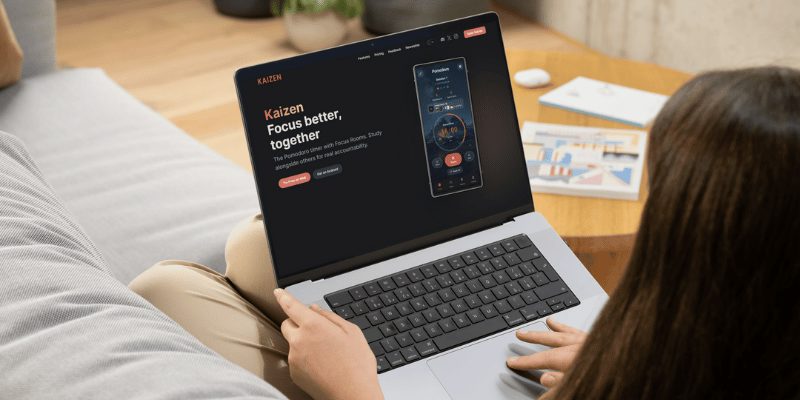
Kaizen is a Pomodoro timer that tries to solve the one problem most timers politely ignore: when you are alone, it is way too easy to “take a quick break” and disappear for 40 minutes.
So Kaizen adds Focus Rooms, lightweight body doubling that gives you the feeling of a study hall without the awkwardness of video calls. You keep your own timer, but you can see who’s focusing, on break, paused, or idle in real time. It sounds small, but it changes behavior fast.
If Kaizen is not in the foreground for more than a minute, it auto-kicks you from the room, because the whole point is being “there” together. One early reviewer captured the vibe: “Love how I can compare estimated vs actual time of my tasks and stay motivated in the focus rooms.”
They provide a polished Pomodoro setup (themes, music, stats) plus Focus Rooms for social accountability, and optional task tracking with automatic time tracking for people who want more structure than a timer alone.
5 most important features
Focus Rooms with public or private rooms (2 to 50 members) and room codes
Real-time presence statuses (focusing, on break, paused, idle) so “being there” is visible
Live timer sync across members while everyone keeps their own timer running
Auto-kick for real engagement if you leave the app too long (Focus Rooms only work if you are present)
Pomodoro customisation + themes + music (with extra premium music library)
Pros
Great “silent accountability” for people who hate camera calls, but still need the social pull
Rooms are flexible, you can use them with friends or join public rooms, and they scale up to groups
Strong combo of structure (Pomodoro) and motivation (Focus Rooms), without turning into a huge productivity suite
Clear free vs premium split, so you can test the timer first and upgrade if you actually use rooms and tasks
Cons
The “keep the app open” rule is effective, but it can be annoying if your workflow requires switching apps often
Focus Rooms are premium, so the core body doubling piece is not the free default
It is very study and desk-work-friendly; it is less of a fit if your tasks are mostly physical or away from your device
Like any room-based system, it works best when the rooms you like actually have people in them when you need them
The right body doubling app is the one you’ll actually use
Body doubling works for a simple reason. It takes focus out of the fantasy zone and puts it into a shared moment. Not forever. Just long enough to start, settle, and finish.
Pick one platform that matches your friction point. If starting is the issue, go for scheduling and a clear session start. If drifting is the issue, choose a room with structure, a host, or visible presence. If video is the issue, pick text-based or low-pressure rooms.
Then run a small experiment. Try it three times this week. If you finish more than you normally would, you’ve got your answer.